

You are using an out of date browser. It may not display this or other websites correctly.
You should upgrade or use an alternative browser.
You should upgrade or use an alternative browser.
Multiplayer names V2.0
- Thread starter hungrymonkey
- Start date


jetmech807
10 Year Member


World of Warcraft:
Hezediah
Haidezeh
(They're my only two 90s, they're both on Shu'halo)
World of Tanks:
Zendon
Star Trek Online:
@Hezediah (8 characters, all under same tag)
Star Wars The Old Republic
Teelargh (Sith Side, Harbinger Server)
Hezediah
Haidezeh
(They're my only two 90s, they're both on Shu'halo)
World of Tanks:
Zendon
Star Trek Online:
@Hezediah (8 characters, all under same tag)
Star Wars The Old Republic
Teelargh (Sith Side, Harbinger Server)

Boostchick02
New Member

Bond007
Founding Member

TheHoff
Member
Xbox live = XGC SUB
I play COD and BF4
60k Members in my Online community, would you like to be one? Never have another lonely night of gaming again. ALL PLATFORMS Contact me for more info
I play COD and BF4
60k Members in my Online community, would you like to be one? Never have another lonely night of gaming again. ALL PLATFORMS Contact me for more info

Bojingles
Well-Known Member
forzalife
Active Member

5.0notslow
Member

mitchell allard
Active Member
91gte303
Active Member

So I looked into my wireless adapter settings tonight. It was on 2.4ghz transferring at 72mbps. I saw under the settings (advanced) that I could set the preference to 5ghz. So I set it and am now on the 5ghz transferring at 300mbps.
How do I do this on a Toshiba running windows 10 and a Broadcom 802.11n network adapter? I looked through the settings like I did with my qualcomm and can't find it. The specs says it should pick up a 5ghz signal, but it is not.
@Noobz347
How do I do this on a Toshiba running windows 10 and a Broadcom 802.11n network adapter? I looked through the settings like I did with my qualcomm and can't find it. The specs says it should pick up a 5ghz signal, but it is not.
@Noobz347

So I looked into my wireless adapter settings tonight. It was on 2.4ghz transferring at 72mbps. I saw under the settings (advanced) that I could set the preference to 5ghz. So I set it and am now on the 5ghz transferring at 300mbps.
How do I do this on a Toshiba running windows 10 and a Broadcom 802.11n network adapter? I looked through the settings like I did with my qualcomm and can't find it. The specs says it should pick up a 5ghz signal, but it is not.
@Noobz347
If your 5ghz radio is working and you're not seeing the SSDN (whatever you call your wifi signals) broadcast for your 5G band then you should tell your computer to "forget" or delete any connections you have for your home router.
Do not do this unless you know what the access credentials for your router are.
Once you cleaned them off, look and see if you see your 5G signal. If not, the radio is probably dead and only your 2.4G remains.
Couple of things to keep in mind. 5G is short range, high speed (relatively) and does not appreciate being moved around. Awesome for laptops etc. that sit on a desk in the same room or next room. 2.4G will maintain a higher consistent transfer rate for mobile or long range devices.
Each device should be given only one band or the other UNLESS it is a wireless-AC device. AC is the only exception and most of what folks have in their hands right now/today is NOT AC compliant. Your router is probably not AC compliant.
Keep as much of the piddly BS off of your 5G radios as possible. High speed and media devices capable of 1080p+. Phones and tablets etc.... 2.4G They don't need anything else.

If your 5ghz radio is working and you're not seeing the SSDN (whatever you call your wifi signals) broadcast for your 5G band then you should tell your computer to "forget" or delete any connections you have for your home router.
Do not do this unless you know what the access credentials for your router are.
Once you cleaned them off, look and see if you see your 5G signal. If not, the radio is probably dead and only your 2.4G remains.
Couple of things to keep in mind. 5G is short range, high speed (relatively) and does not appreciate being moved around. Awesome for laptops etc. that sit on a desk in the same room or next room. 2.4G will maintain a higher consistent transfer rate for mobile or long range devices.
Each device should be given only one band or the other UNLESS it is a wireless-AC device. AC is the only exception and most of what folks have in their hands right now/today is NOT AC compliant. Your router is probably not AC compliant.
Keep as much of the piddly BS off of your 5G radios as possible. High speed and media devices capable of 1080p+. Phones and tablets etc.... 2.4G They don't need anything else.
The Toshiba issue is more than likely a driver issue (researched) I found a new windows 10 driver released this month and will see about updating that tonight. The router/modem is a brand new Netgear AC1900. We rarely use our phones for internet or data transfer while home so I put them on the 5G and the laptops are used within 10 ft. of the router and are relatively stationary on the TV trays we set them on so I put them on the 5G as well. The wireless speaker transmitter and receiver are 2.4G only and will remain. The other wireless devices in the home are not network capable but may still cause radio interference from time to time (things like the emergency call transmitter for the father in law)
Thanks for the assist @Noobz347 I'll let you know how the driver update goes and how the install of the ordered wifi card goes (should be delivered tomorrow)
Edited for modem correction to AC1900
Last edited:
brand new Netgear AC1900
This is half the battle.
You should remove your phones from the 5G portion of your network. The extra traffic is minimal in terms of actual throughput but each session that is established by a mobile device, decreases the performance of that band a lot more than just the total of data throughput.
Over the total use of a day (you can test this yourself if you really want to) You will have a larger total of throughput over 2.4G than you will with 5G non-AC. You also get a lot more reach with fewer interruptions (or switches between wifi and cellular).
5G likes a clean stable signal, as little packet loss as possible, and high throughput (relatively speaking). As the user, you will also notice fewer delays (pauses) and drop-outs, over 2.4G radios.
@Jinx
I don't recall what part of the country you are in but your internet connection is probably not 300Mbps both ways. lol
For Laser, it might make a bit more sense because his internet bandwidth is so high. Really though.... 300 Mbps is great for transferring large files. It's not needed for streaming video etc. Not even in HD.
Your router is a good one. It also has a large, built-in, streaming buffer and QoS. It much more efficient to manage your wifi than it is to toss all you can on the fastest freq. Reserve those for 5G AC devices that won't be operated in the yard, upstairs, etc.
I don't recall what part of the country you are in but your internet connection is probably not 300Mbps both ways. lol
For Laser, it might make a bit more sense because his internet bandwidth is so high. Really though.... 300 Mbps is great for transferring large files. It's not needed for streaming video etc. Not even in HD.
Your router is a good one. It also has a large, built-in, streaming buffer and QoS. It much more efficient to manage your wifi than it is to toss all you can on the fastest freq. Reserve those for 5G AC devices that won't be operated in the yard, upstairs, etc.
@Noobz347
So I uninstalled the existing wifi card, powered down, removed existing card, put in new card, system does not boot. I then removed new card, put old card back in and system booted fine. Any ideas as to what went wrong?
I have attached pics of the original wifi card so that you can see if I bought a card that will not work with my laptop.
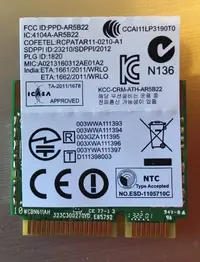
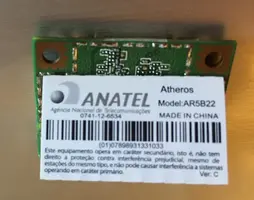
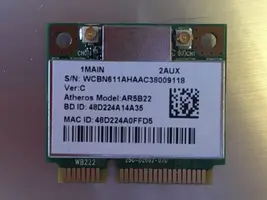
So I uninstalled the existing wifi card, powered down, removed existing card, put in new card, system does not boot. I then removed new card, put old card back in and system booted fine. Any ideas as to what went wrong?
I have attached pics of the original wifi card so that you can see if I bought a card that will not work with my laptop.
@Noobz347
So I uninstalled the existing wifi card, powered down, removed existing card, put in new card, system does not boot. I then removed new card, put old card back in and system booted fine. Any ideas as to what went wrong?
I have attached pics of the original wifi card so that you can see if I bought a card that will not work with my laptop.
The first thing that I would do is get on the manufacturer website for your laptop. There is every chance in the world that your BIOS requires updating in order to recognize this card which was designed much later.
BIOS Update then holler and lemme know what happens.