Audio Peeps, In Here.

Jinx

I like cats, cats like me. Cats and I fully agree.
20+ Year Stangneter :roc</strong><span class=
Oct 2, 2003
12,166
4,237
223
Cat Country
My father-in-law is hard of hearing. He refuses to wear a hearing aid because they make the inner canal of his ears hurt. He told me he wants to watch TV without maxing out the volume on the TV. He wants to be able to use any over the ear headphones.

Here is the problem... the TV has no audio out ports. The cable box has both HDMI (which is currently connected to the TV) and a L&R RCA jacks (which are internally disconnected when the HDMI link is active.)

So I need something that can sit near the TV speaker and broadcast to a head set. It would be nice if the transmitter could be plugged in to a power source. or is there a "splitter/tap" HDMI accessory that will allow for signal to pass through to the TV while a headphone can be tapped into the accessory?
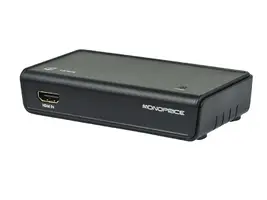
 
would something like this work?
102511.webp
102512.webp
Out from DVR to this device. Then HDMI to TV. with an audio out jack for headphones?
 
It should work, provided that plugging into the audio output doesn't deactivate the HDMI sound feed (assuming he's not watching alone).
 
It should work, provided that plugging into the audio output doesn't deactivate the HDMI sound feed (assuming he's not watching alone).
Yeah it's mainly when he's watching alone. I swear he sits in that TV room (10x12) 5 hours a day with that TV blaring at Max. I think my dog is going deaf because of it. I just want it so that if he does not want to use the headset, he does not have to get up and unplug it from the converter unit.

I will probably need a battery powered in-line signal amp and an in-line volume control. It need to stay as simple as possible. No USB charging, or plugging and unplugging.
 
I can't think of anything I have seen that would allow both. Maybe a receiver where you can switch audio output via the remote thus meeting your requirements. Or just wire the main speakers right next to the seating area. I'm not sure what your setup is like already.

If you don't have any luck here, check out the AVS forums...the people there always seem to have a solution.

Oh, this may sound silly, but what about a baby monitor. Microphone part by the tv speaker with the volume at a tolerable level. If you can find one with a headphone jack on the receiver and volume control...he could still control tv volume via remote and remove headphones at any time. Redneck style homie!

:shrug.


Sent from my iPhone using Tapatalk
 
  • Like
Reactions: Jinx
I can't think of anything I have seen that would allow both. Maybe a receiver where you can switch audio output via the remote thus meeting your requirements. Or just wire the main speakers right next to the seating area. I'm not sure what your setup is like already.

If you don't have any luck here, check out the AVS forums...the people there always seem to have a solution.

Oh, this may sound silly, but what about a baby monitor. Microphone part by the tv speaker with the volume at a tolerable level. If you can find one with a headphone jack on the receiver and volume control...he could still control tv volume via remote and remove headphones at any time. Redneck style homie!

:shrug.


Sent from my iPhone using Tapatalk
Redneck style indeed! I laughed at the suggestion, not because it's out there, but because I have already implemented this for the washer and dryer in the garage. Walls are so well insulated that we can't hear when they are done. Baby monitor fixed that.
 
  • Like
Reactions: DocG
OK, the TV has a digital audio out port. anyone know about these things? I assume it's still a 'signal only' with no amplification from the TV itself?
 
OK, the TV has a digital audio out port. anyone know about these things? I assume it's still a 'signal only' with no amplification from the TV itself?


LOL on the last post!

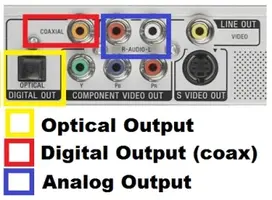
Is it a coax audio out or the optic? Rca looking plug or more like an Ethernet plug?

Either way my guess would be there is no amplification from the tv. I have run those from a receiver which provides the amp, but I doubt the tv amps it. Typically just a nice clear digital audio signal sent to your device.


Sent from my iPhone using Tapatalk
 
If it has a digital audio out jack, you can buy a D/A converter from radio shack to switch it over to RCA (https://www.radioshack.com/products/radioshack-digital-audio-to-analog-converter?variant=5716984837). I dont know what TV you have, but even old ones in the past would still allow audio over the speakers even if you had something plugged into the line-out (usually in the menu settings).

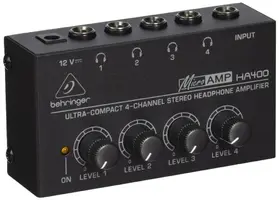
So, you've got your left/right, now we just need volume for the headphones. You can find mini powered amplifiers like this one, http://www.sweetwater.com/store/detail/HeadAmp4 . No idea on the quality of that, looked somewhat inexpensive and simple to plug up. So just get some wire, solder some RCA plugs on one-side and a TRS 1/8" or 1/4" on the other and pop it into that unit. Keep the DA converter by the TV, the headphone amp by your father in-law and you are good to go. Also, since he's hard of hearing, look at closed back headphones instead of open-back. That way you won't have to listen to as much coming out of the headphones when he has them jacked up.

If you have a budget to spend, you can always look into Bluetooth options as well. But old people and remembering to charge things...blah. haha.
 
  • Like
Reactions: Jinx
It's the optical audio out. The TV itself is a Panasonic LCD . I wrote down the model number to google search and google came back with nothing :(. It has 3 HDMI in. 1 set of RGB with L/R audio in, and one optic audio out. That's it. Not much wiggle room for options. I considered the bluetooth, but trying to explain how to reconnect after a power outage or battery loss would fall on def ears. (see what I did there?)
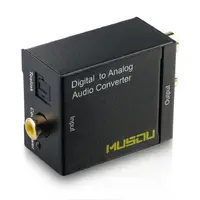
 
@XStang302x your set cost $105 + RCA cable ($15) = $120
Proposed set below = $57

So with a better understanding this is what I had devised: (any comments welcome)

Keep in mind this is not meant to be a high end audio system, it is merely so he can listen to his news channels and educational channels. Maybe a DVD from time to time.

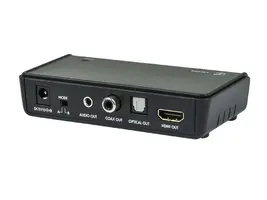
From the TV to this DAC:
71oFf9wBrmL._SL1000_.webp

From the DAC to the Amp (15ft)
612HSNWlO3L._SL1500_.webp

The Amp:
81xBZh9k7LL._SL1500_.webp

Adapter for amp to headset (if needed)
71%2BGmZauNnL._SL1500_.webp
 
Ya, I didn't spend too much time price shopping on the pieces, just wanted to give examples of what you should look at. All of that should work just fine though!

Another thing to check, look at the optical out on your TV. Hopefully it's a standard TOSlink cable jack (like the one pictured on the D/A box). I had to set something up on a Samsung a while back and their optical out required a special adapter to get it over to TOSlink. The cost was a only a few bucks but had to be special ordered, just annoying when you had everything else ready to go.
 
  • Like
Reactions: Jinx
Looks like a good plan!

Did you ever figure out if the tv speakers will be bypassed using the optic audio out? It shouldn't but was curious.

Most tvs I have owned come to think about it, only bypass the speakers if something is plugged into an actual headphone jack.


Sent from my iPhone using Tapatalk
 
I imagine he will be alright, my old tube tv from 1998 allowed for audio to be sent line out as well as having the built-in speakers play (I honestly think optical outs are always active), you could turn them off if that was desired as well. I'm pretty sure the optical audio out will be at a fixed volume as well (which is what you want), though I could be wrong. Most of the time there are options within the TV to have the volume for outputs and speakers to be set to variable or fixed.
 
Looks like a good plan!

Did you ever figure out if the tv speakers will be bypassed using the optic audio out? It shouldn't but was curious.

Most tvs I have owned come to think about it, only bypass the speakers if something is plugged into an actual headphone jack.


Sent from my iPhone using Tapatalk
This will be trial and error since I can't even locate a user manual PDF searching google with the model number of the TV. If it does, I can always get some stereo jacked speakers (like for computers) and plug those into the extra ports on the Headset Amplifier box.

Kind off funny taking high tech to low tech. But that's my FIL for ya.