fan crapping out

Blackened302

Active Member
Jul 21, 2005
1,439
0
36
South TX
searched to no avail..


how can i tell if it's the fan motor that's crapping out on me?

the fan doesn't turn on once the engine is up to temp.

if i tap on the motor, it'll turn on and the engine will run cool, then turn off like normal. tapping on the ccrm does nothing, but fuel pump is working fine (i know it's not an accurate way of testing...).

when the heat rises again, the fan won't turn on again like it's supposed to (unless i hammer the fan motor).


should i just hard-wire the high-speed fan directly and see how long it takes for the motor to fully give out or catch fire ( :D ) or should i just replace the fan motor?

i'd much rather test before buying the $90 motor, though.. perhaps one off a v6 will fit?

need to fix this asap--appreciate all the help i can get.
 
Paul, if it's not one thing on your car..............

I'd unplug the fan and see if the high speed terminal is all charred up.

When high should be on, put a test light on the high speed wire and see if power is reaching the high speed terminal (the bottom-most one, IIRC).

It really does sound like the fan motor has taken a poop on you though. The tapping is just what it takes to bash the brushes and crap around and wake it up. You're smart to deal with it now before it causes a huge draw and starts a fire.

Good luck.
 
lol, i know, JT, that's been my anthem these past few weeks... fix one thing, another breaks.


one of the terminals (i think it's the orangeish one) does look a little fried & charred, i'm guessing that's the high-speed, especially since it seems that the high-speed fan isn't turning on. i don't have a test light, but i'll check w/ my multimeter--guess it needs to show 12v when the high's supposed to be on, correct?

it wasn't coming on at all, so i got a manual fan from my BIL just in case, but i don't think it's gonna work. new fan motor comes in tomorrow morning.

anyhow: i cleaned up the connection at both the motor and at the harness--there was lots of crap in there. the low-speed comes on when it's supposed to now, but it seems the high isn't. the temperature will keep rising and the fan will be on, but i think it's just the low-speed since the temperature doesn't go down like it normally would before all this crap happened.

is there a way to wire up l.e.d.'s--one for the low, another for the high--to serve as indicators as to when the low is on and when the high is on? i'm guessing one end of the l.e.d. goes to the low wire, the other to a ground, and the same for the high l.e.d., correct?

thanks for the reply, man!
 
alright, busted out w/ the multimeter!

what i think is low speed, the middle wire reads 12v's WHILE AT THE SAME TIME the lower wire reads 8-9 volts.

it didn't get hot-enough to trigger the high-speed, much less for me to read 12v at the lower wire.

thoughts?
 
Oy. Check CCRM Pin 17 for ground, and Pin 14 for 12 volts when you are seeing 12 volts from both fan terminals. if both are present, there's a short in the control side of the fan wiring and a new motor will be wiped out.

If both fan speeds are on at the same time, the fan runs just a little faster than low speed and it burns up the fan motor. Question: There's no chance the high and low Fan temps were overlapped in the TwEECer programming, is there?

FWIW, I ran around with only low speed for over a year (my PCM would not shut low off and make high come on, even with AC). For testing, on a properly functioning fan assembly, you can just turn on the max AC - that will shut low speed off and high on.

I have other ideas but you have to modify your OEM wiring - I wouldn't do it until more testing is done.

For your LED idea, you got it. I would put the LED's biased across the positive and negative wires at the fan itself. Here's Slantman's method. However, he uses the control side wiring. If your relay fails or the fuse blows, your LED still lights up. Going across the fan terminal assures the LED only comes on if power is reaching the fan. Honestly, it's all overkill IMHO - you know when the fan is or isnt on. I'd rather have manual switches. If you dont want that, you can put a Tee on Pin 17's wire and leave it in an insulated terminal under the hood. Worst case, you can pull over and ground the wire, turning on high speed. This is not a bad roadside-repair precaution anyhow.

When you get your fan motor, let me know if it comes with two speeds. Some of the fan motors out there are V6 motors. Oh, I agree that a mech fan might be hard to fit (atleast a fox III set-up would be).

Good luck bud.
 
took a shot and drove (attempted to, rather) it to a buddy's house for a bbq--figured i deserved the relaxation. started overheating on the way over, about 4 miles from home. the low-speed fan was on, but it wasn't enough.

had to wait for it to cool down to about the O, luckily that was enough for the low-speed fan to handle and i just pulled into the driveway. guess i'll be taking the Jeep.

need to fix this by tomorrow--work monday morning....

should i just try and fit the manual fan on there (i'd have to remove the overflow resevoir, aside from the fan + shroud) if even the new fan motor doesn't work?
 
took a shot and drove (attempted to, rather) it to a buddy's house for a bbq--figured i deserved the relaxation. started overheating on the way over, about 4 miles from home. the low-speed fan was on, but it wasn't enough.

had to wait for it to cool down to about the O, luckily that was enough for the low-speed fan to handle and i just pulled into the driveway. guess i'll be taking the Jeep.

need to fix this by tomorrow--work monday morning....

should i just try and fit the manual fan on there (i'd have to remove the overflow resevoir, aside from the fan + shroud) if even the new fan motor doesn't work?

I think we overlapped on posting. Worst case I'd disconnect the fan connector and run a jumper to ground the fan (from ground in the fan connector to the ground fan terminal). You could jump the low speed fan wire to the high speed terminal (or just use high speed if it works ok). The point is to get it so you dont have two fan speeds running at once.

You can rig together a reservoir if you need to, or strap it to the side of a mech fan shroud. A 6 dollar reservoir from the parts store works fine too.

Can you go strip your BIL's car overnight? J/K

Good luck.
 
thanks for the help so far, JT.

i tried testing to see if the high would come on w/ Max A/C on and no, it does not--another reason that leads me to believe my high-speed isn't working.

i'll try and jump the high at the ccrm tomorrow and see if that turns it on.

i'll also make sure they fan speeds aren't overlapping in the tweecer, but i'm honestly sure they aren't--things didn't go bad w/ my fan until my radiator busted.
 
It depends what is jiggling around. Generally speaking, no. :lol: The coils have been known to break loose in these things - it could be that. If you have a buddy who likes soldering circuit boards, he can fix it.
 
hmm... i'm thinking the high-speed fan relay in the ccrm broke. i'm singleing it out because the fuel pump and low-speed ones seem to be working fine.


i have the part# to the ccrm: f48f-12b577-aa. an autoparts store (advance, oreilly's) wouldn't happen to sell them, would they?


is there anywhere i can get teh wiring to wire up 4 seperate relays myself tonight?
 
i have the part# to the ccrm: f48f-12b577-aa. an autoparts store (advance, oreilly's) wouldn't happen to sell them, would they?

They won't sell it. Ford sells it, but it is absolutely rediculous. Last time I checked, about a year ago, they quoted me over $200. Yes, over $200 for the CCRM. Find one from a junkyard or ebay if you want to replace the module.
 
well, i'd want to get a new one (who's to say this won't happen again with replacing it w/ a used from the junkyard?) but not for that much! they're crazy. 4 relays = ~$30, new *ccrm* = +$200??? screw Ford.


i would like to wire 4 seperate relays (i think the ccrm controls 1. fuel pump, 2. a/c compressor, 3. low-speed fan, 4. high-speed fan----this correct?) as that would be more economical, smarter, and less costly in the longrun.


gonna take a wild gander and say:
pins 1-6 are for one thing, 7-12 for another, 13-18 for another, and 19 24 another, yes? that would make splittin gthe wires up and figuring out what goes to what much much easier.

any help in wiring seperate relays would be greatly appreciated!
 
Paul, if you apply ground to pin 17 and the high speed fan comes on, the high speed relay works. If this is the case, you have a PCM, EDF relay control issue, or wiring issue. Been there done that and wasted a lot of time tracing it.

For right now you could just wire up a 30/40 amp SPST relay (SPDT relays are more common and will work fine too). I'd just do it for high speed to make it simple for now. You could put the relay by the underhood fusebox or tap into the CCRM wiring and basically have your relay be in parallel with the OEM relay.

If you're low speed circuit works:
You could use the low speed fan input to energize the new relay (so when low used to come on, now high speed will come on). Even simpler is to disconnect your fan connector. Ground the fan's ground terminal. Now run a jumper from the middle fan harness terminal to the high speed fan terminal. Now the fan will come on high speed when it used to be low speed. This is a 5 minute rewire (one jumper, one ground wire). I'd try this myself (I almost did that when mine acted up).

If you get sick of this and have 100 extra bucks ( :rolleyes: I know), get a DcControl.com controller (FK35). It's totally AWESOME!
Good luck Paul.


Oh to finish the other thoughts. The CCRM also houses the EEC relay. And the compressor relay is the WOT relay (it shuts off your compressor at WOT).
 
thanks, JT. i think i'll do the simple 1-ground-1-jumper thing...


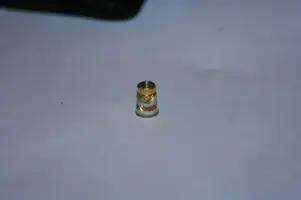
here's what was rattling around in my ccrm--it's about the size of a pencil's eraser:

wtf.webp


now i'm worried about the eec relay in there...


now, when you say this:
"If you're low speed circuit works:
You could use the low speed fan input to energize the new relay (so when low used to come on, now high speed will come on). Even simpler is to disconnect your fan connector. Ground the fan's ground terminal. Now run a jumper from the middle fan harness terminal to the high speed fan terminal. Now the fan will come on high speed when it used to be low speed. This is a 5 minute rewire (one jumper, one ground wire). I'd try this myself (I almost did that when mine acted up)."

do i reconnect the harness at the fan after adding the jumper wire (from low to high) and grounding the ground wire? otherwise, i don't see how the fan will get power if the ground terminal is the only thing really connected.
 

Attachments

  • wtf.webp
    wtf.webp
    4.9 KB · Views: 97
do i reconnect the harness at the fan after adding the jumper wire (from low to high) and grounding the ground wire? otherwise, i don't see how the fan will get power if the ground terminal is the only thing really connected.
No, you don't reconnect the fan connector.

To make it easier to envision: pull the fan connector off the fan. Look at it as if you're going to plug the connector back in. Instead of plugging it back in, you will use real short jumper wires to connect things since you're crossing two circuit. You could run a jumper from the ground wire to the ground terminal (on the fan). Rather than using the OEM ground wire, you can just run a ground wire. It doesnt matter though.

Then for the fan power, you will be running the fan on high speed only. But your high speed wiring is jacked (but low speed works normally, right?). So you will put a jumper from the low speed wire to the fan's high speed terminal. This will just get your fan moving faster since low speed was not enough for you. I would use a short piece of 10 AWG wire for each jumper, with soldered and insulated spade terminals (they fit - been there and done that).

Now in essense, you will have the middle harness wire connected to the bottom fan terminal, and the top wire still goes to the top fan terminal (or a ground).

Is that a little more clear? A pic would make it real simple but homie can't do that stuff.

Good luck.
 
hehehe, that's clear, thanks man.


now, just put ground to pin #17--the high-speed fan turned on.
also put power to pin #14--low-speed turned on, too.

both turn on that way ^^^.

i don't understand...

should i just try and wire the fan speeds manually (similar to chris', aka CTMAN, set-up)?

there is still a problem, though--it isn't working the way it should on it's own...
 
My CCRM went bad and cost me just over 100$. Not cheap still. I think if you could isolate ALL the CCRM stuff on sep relays it would be cool. However, I think its not so cut and dry with how its wired. IIRC some of the relays are shared.

Also with the A/C part of the CCRM (not to steal the thread) but if the A/C has been removed should one do something with the wires of the A/C? Since it does deal with WOT wires and eec fucntion?

I did the fan switch mod years ago when I went to a 180* stat (that prob. IMHO wore out the CCRM faster) and it worked wonders until I got the tweecer. It may be worth a try to see if the CCRM is having a ground issue by doing the bypass. If the fan kicks on with the bypass the unit may have a ground issue.

Oh, another thing...if the CCRM is cheaper out here and you want a new one, let me know. There is a local dealership my father-in-law (snap-on franchisee) goes to that when I went to get a few parts for him they put me in as part of his "at cost" code/discount and it just comes up at time of purchase (preatty cool of them). If you want I could stop buy and get a price check on the part with the discount (if they give it to me on the elec. part) and if its not too bad you could buy it new threw me if you want...:shrug: