
Well my name is Steve. And I just found this site a couple days ago, And already read several interesting post, and received a couple very helpful tips.Thanks.
You are using an out of date browser. It may not display this or other websites correctly.
You should upgrade or use an alternative browser.
You should upgrade or use an alternative browser.
Hello, I'm new.
- Thread starter Stevejr
- Start date

Yobi1Kanobi
Member
- Apr 9, 2003
- 559
- 0
- 16

j_lutter31
Member

Bosko5.0
Active Member

Nik_95Cobra
Founding Member
Bosko5.0
Active Member

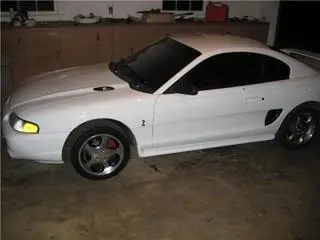
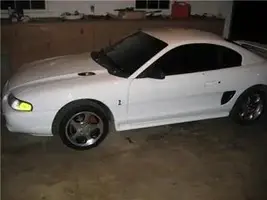
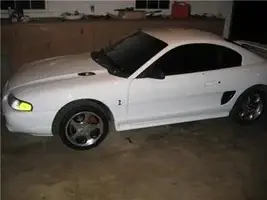
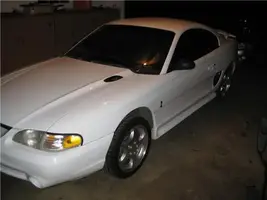
I was just trying to add a pic to my signature. I dont know much bout computer sorry Shes just a white cobra tinted windows yall know what she looks like just close ya eyes and look at her shes a beaut. Cause I aint gettin any pics on here anytime soon.
P.S. I don't even know where them tags are you were talkin bout HISSIN.
P.S. I don't even know where them tags are you were talkin bout HISSIN.

Welcome to the site. Postin pics is always fun when youre new. I can see your ride in my mind though!

drakesdad
Member
.http://i52.photobucket.com/albums/g33/drakesdad/33184B_4.jpg?t=1229967386...................this[/url] is the url of the pic......put
 behind it and you get the pic.

Welcome Steve...
As JT was saying ...just copy the img..... I have always "copy" d and "paste" d the url for a pic I was pasting.....type this in front of the url

If you are on photobucket and you have the pic you want to post under the pic or to the right if you enlarge it there is Share URL, Direct Link, HTML code and then fourth at the bottom is IMG code..it already has what you need to post...just click and copy then paste on here....
Welcome to the site.....
Welcome Steve...
As JT was saying ...just copy the img..... I have always "copy" d and "paste" d the url for a pic I was pasting.....type this in front of the url
If you are on photobucket and you have the pic you want to post under the pic or to the right if you enlarge it there is Share URL, Direct Link, HTML code and then fourth at the bottom is IMG code..it already has what you need to post...just click and copy then paste on here....
Welcome to the site.....


Put the URL link for the pics between IMG tags (as above).
And offically welcome to SN.
.http://i52.photobucket.com/albums/g33/drakesdad/33184B_4.jpg?t=1229967386...................this[/url] is the url of the pic......putbehind it and you get the pic.
Welcome Steve...
As JT was saying ...just copy the img..... I have always "copy" d and "paste" d the url for a pic I was pasting.....type this in front of the url
If you are on photobucket and you have the pic you want to post under the pic or to the right if you enlarge it there is Share URL, Direct Link, HTML code and then fourth at the bottom is IMG code..it already has what you need to post...just click and copy then paste on here....
Welcome to the site.....
Man O Man

I followed Will's and JT's instructions to the letter

I just don't understand what happened

I was gonna add a bit of info to try and help Mr. Steve

I thought I'd post a pic of my Mighty 5 point 0

and
Look what happened

Grady

<a href="http://s260.photobucket.com/albums/ii18/leanin_sideways/?action=view¤t=cobra1.jpg" target="_blank"><img src="http://i260.photobucket.com/albums/ii18/leanin_sideways/cobra1.jpg" border="0" alt="Photobucket"></a>
Mr Grady, 
Fixed:
Steve, hit the quote button on my post and you will see the exact syntax of the picture format. Use that as a template for other pics.
<a href="http://s260.photobucket.com/albums/ii18/leanin_sideways/?action=view¤t=cobra1.jpg" target="_blank"><img src="http://i260.photobucket.com/albums/ii18/leanin_sideways/cobra1.jpg" border="0" alt="Photobucket"></a>
Fixed:
Steve, hit the quote button on my post and you will see the exact syntax of the picture format. Use that as a template for other pics.
Attachments

1. Go to your photobucket account and find the picture you want to post here.
2. Put your cursor over the picture.
3. A menu will drop down w/ 3 options to choose from.
4. Go down to where it says IMG Code, copy that link and paste it into the box you type in to post.
2. Put your cursor over the picture.
3. A menu will drop down w/ 3 options to choose from.
4. Go down to where it says IMG Code, copy that link and paste it into the box you type in to post.
drakesdad
Member
AHHH Grady, I understand listening to JT.......but I have been known to go around my elbow to get to my arse........from time to time........
Yobi1Kanobi
Member
- Apr 9, 2003
- 559
- 0
- 16
Similar threads
- Replies
- 0
- Views
- 72
- Replies
- 5
- Views
- 257


