DC Controller/Mark Vii wiring help

93GTosu

Member
May 5, 2005
183
0
19
DC Controller/Mark 8 wiring help

Well everyone helped out amazingly with my 3G install!!! THANKS SO MUCH!! :D

Now i'm attempting to hook my DC Controller up (Looks hawt btw).

I'm running a Mark 8 fan. I have the wiring harness for it which consitis of 3 wires...2 black and 1 blue.

Which is high speed and which is ground? I've looked everywhere including Srothfuss's write up but didnt see it.


***ALSO, the directions indicate to connect the "ground" and "input" wires directly to battery terminals....how do i go about this? (sorry if this is something basic)

This is the basic idea of what i think im doing: (i do like pictures :) )
edit: I forgot the fusible link but i know its there

justindccontroliw5.webp


thats it as of now....

thanks in advance!! :nice:

 

Attachments

  • justindccontroliw5.webp
    justindccontroliw5.webp
    2.8 KB · Views: 115
if you dont have the wires on it. with the fan in place and the plug in on the passenger side the bottom prong is the ground the middle one is low speed and the top one is high speed.

ok cool! Thanks i can get that hooked up now!

now how do i connect to the battery??? :shrug: ....i have no idea about this part... it says:

"Route the wire to the positive battery terminal...attach the fusible link and connect to the battery terminal"
"route the wire to the negative battery terminal...attach the 5/16 ring terminal and connect to the negative battery terminal."

but neither of those rings fit on the battery...or am i missing something incredibly easy here?? :mad: :(
 
well maybe i figured it out...i "un-threaded" the bolt on my battery clamps very carefully because they're so old looking that i think they're about to come apart. I put the ring terminals on these bolts and re-connected them.

simple enough i think, i suppose this is what everyone might be doing.

now to find a home under the hood for the yellow wire on the DCC....
 
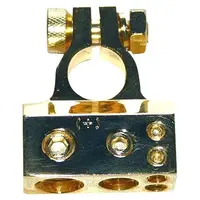
Consider getting new battery terminals with accessory posts on them.

The ones I use are very similar to this:

Battery_Terminal.webp
 

Attachments

  • Battery_Terminal.webp
    Battery_Terminal.webp
    23.4 KB · Views: 104
if you have solid terminals that connot be disconnected from the cable just remove the terminal and take anything sharp and notch the terminal a little bit, lay your wire in it and reconnect. if its a split terminal that has two half inch bolts holding it to the cable (i think you do) just undo them cleen your cable and trerminal real good lay new wire in and reconnect.
 
ok, i connected the wires to the battery like in my drawing.

i also spliced the yellow wire into the red wire of my low coolant sensor plug (which isnt hooked up) but when i connect the battery, the fan turns on full speed. what gives?? :shrug:
 
on a side note....dont try and grab anything remotely close to those fan blades when they're going....even if they're moving slow.

ouch. i'm bleeding everywhere. damn thing almost bit my finger off. :(
 
ok got the 12V key on to work.

NOW the fan isnt blowing very much. I cant feel it past my serpentine belt, but if i feel on the other side of the rad i can feel just as much air....

i've been looking at it trying to figure out....maybe my sensor isnt in far enough??

*bleeding stopped btw, HUGE chunk out of my middle finger...
 
I just did a fan swap after my fan disintegrated and I have a nice slice out of my finger - the edges of fan blades are razer sharp. I cant imagine having a spinning fan hit a finger. Ouch!

You should definitely feel a ton of air moving out of the firewall side of the fan. With your hand in front of the condensor, you feel like a very light movement of air. Ensure the fan is blowing the correct way.

Did the fan bench test at full speed?
The correct (high speed) wire is connected to the fan controller?

The probe has a little flare and ridge to tell you when it has seated.

Ensure you are reaching your target temp when noting fan speed.

Good luck.
 
i've seen the fan at full speed so i know it works ok--but good point

i have the probe mounted directly next to the lower radiator hose. probably 5-7 fins in and near the top of where the hose fitting is. I have it pushed in as far as i can. The fan prevents me from mounting it anywhere else as i had to skew it to the side to prevent hitting the waterpump pulley.

i have the underdrive jumper in so its at 10% constantly. no jumper no speed.

got to 195 and the fan was at 10% or 0% (with and without the jumper respectively).

even if my probe wasnt in all the way, shouldnt it still get the hint to kick on at 195???

i also am pretty sure i've got the sensor pins (1,2) on correctly. i've tried both ways here also.
 
HAHAHAHAHAHA!!!! :lol: :rlaugh:

i still cant believe it nipped me though....i mean i've touched my stock fan before and it didnt cut my arm off or anything.

but maybe thats what i shouldve done instead of a mark8...sharpen my stock fan blades so they move more cfm. somebody should test this.
 
This might be redundant but............

If you turn on the AC, does the fan spool up to about 50%? This is a quick test of the controller being hooked up correctly.

Do you see 5 volts across pins 1 and 2 with the sensor disconnected?

It still sounds like a probe insertion :p issue. Your placement sounds ok (as long as it's near the radiator outlet, it should be ok). Ensure the fins are snug against the sides of the probe.

If it's still acting up, I might email Brian.

Good luck.
 
This might be redundant but............

If you turn on the AC, does the fan spool up to about 50%? This is a quick test of the controller being hooked up correctly.

Do you see 5 volts across pins 1 and 2 with the sensor disconnected?

It still sounds like a probe insertion :p issue. Your placement sounds ok (as long as it's near the radiator outlet, it should be ok). Ensure the fins are snug against the sides of the probe.

If it's still acting up, I might email Brian.

Good luck.

do i HAVE to hook up that wire? i ripped out my AC long ago...but if that wire needs hooked up regardless...it could be my problem because i didnt.

i've never been good with "probe insertion" ( :rolleyes: ) so i attempted again and same results.

the only way i get the fan to move is with the underdrive jumper. If i dont have that jumper, at 195-200 the fan was still off.


i might just email brian, he'll probably be able to tell me whats up. Although i hate to bother the guy....he's so damn busy and all. The car is being shut down for the week or so because i'm going to be incredibly busy with classes...i'm just gonna bum rides till i can sort this out.

thanks very much guys.
 
do i HAVE to hook up that wire? i ripped out my AC long ago...but if that wire needs hooked up regardless...it could be my problem because i didnt.

i've never been good with "probe insertion" ( :rolleyes: ) so i attempted again and same results.

the only way i get the fan to move is with the underdrive jumper. If i dont have that jumper, at 195-200 the fan was still off.


i might just email brian, he'll probably be able to tell me whats up. Although i hate to bother the guy....he's so damn busy and all. The car is being shut down for the week or so because i'm going to be incredibly busy with classes...i'm just gonna bum rides till i can sort this out.

thanks very much guys.


Nope, you don't need to have the AC wire hooked up. If you feel like it, just connect a 12 volt wire to that little AC-input wire and see if the fan kicks on. That would atleast let you know the controller is kickin'. IIRC, that's a recommendation from Brian's troubleshooting page.

Checking for voltage at pins 1 and 2 is also from his troubleshooting page.

Brian won't mind the email I don't think. He likes to nip troubleshooting in the toosh [before people get frustrated] and can normally do so with like a one paragraph email. I've seen people post gripes about emailing him but his replies and reply-times were always second-to-none and totally stellar in my experience.