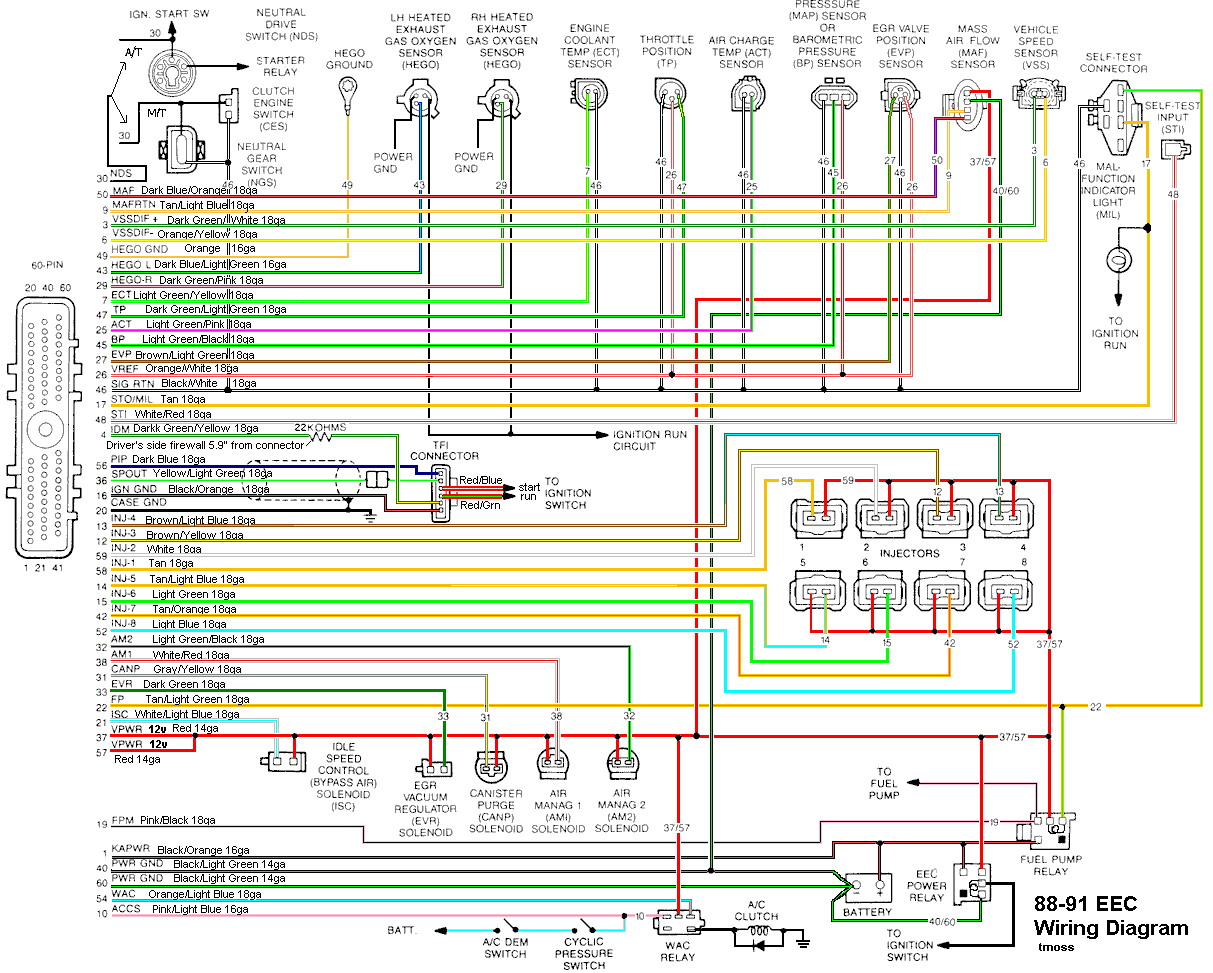
Try this first, or use the diagram to make sure you have the code reader connected to the correct wires. Connect the code reader or jumper the wrong wires and you can damage the computer.
Dumping The computer diagnostic codes on 86-95 Mustangs
Revised 19-May-2009 to update drawing for dumping the codes on 86-88 Mustangs with no check engine light.
Dump the codes and see what the computer says is wrong…
Codes may be present in the computer even if the Check Engine light isn’t on.
Here's the way to dump the computer codes with only a jumper wire or paper clip and the check engine light, or test light or voltmeter. I’ve used it for years, and it works great. You watch the flashing test lamp or Check Engine Light and count the flashes.
Be sure to turn off the A/C, and put the transmission in neutral when dumping the codes. Fail to do this and you will generate a code 67 and not be able to dump the Engine Running codes.
Dumping the Engine Running codes: The procedure is the same, you start the engine with the test jumper in place. Be sure the A/C is off and the transmission is in neutral. You'll get an 11, then a 4 and the engine will speed up to do the EGR test. After the engine speed decreases back to idle, it will dump the engine running codes.
Here's the link to dump the computer codes with only a jumper wire or paper clip and the check engine light, or test light or voltmeter. I’ve used it for years, and it works great. You watch the flashing test lamp or Check Engine Light and count the flashes.
See
Troublcodes.net Trouble Codes OBD & OBD2 Trouble Codes and Technical info & Tool Store. By BAT Auto Technical
If your car is an 86-88 stang, you'll have to use the test lamp or voltmeter method. There is no functional check engine light on the 86-88's except possibly the Cali Mass Air cars.
The STI has a gray connector shell and a white/red wire. It comes from the same bundle of wires as the self test connector.
89 through 95 cars have a working Check Engine light. Watch it instead of using a test lamp.
The STI has a gray connector shell and a white/red wire. It comes from the same bundle of wires as the self test connector.
WARNING!!! There is a single dark brown connector with a black/orange wire. It is the 12 volt power to the under the hood light. Do not jumper it to the computer test connector. If you do, you will damage the computer.
What to expect:
You should get a code 11 (two single flashes in succession). This says that the computer's internal workings are OK, and that the wiring to put the computer into diagnostic mode is good. No code 11 and you have some wiring problems.
Codes have different answers if the engine is running from the answers that it has when the engine isn't running. It helps a lot to know if you had the engine running when you ran the test.
Trouble codes are either 2 digit or 3 digit, there are no cars that use both 2 digit codes and 3 digit codes.
If you are sure that you have connected everything up correctly, here's the next step...
Computer will not go into diagnostic mode on 86-90 model 5.0 Mustangs
Disconnect the battery positive terminal before making any resistance checks.
The small voltage drop in the battery cables will cause incorrect resistance readings.
Computer diagnostic connector:
How it is supposed to work:
The black/white wire (pin 46) is signal ground for the computer. It provides a dedicated
ground for the EGR, Baro, ACT, ECT, & TPS sensors as well as the ground to put the
computer into self test mode.
If this ground is bad, none of the sensors mentioned will work
properly. That will severely affect the car's performance. You will have hard starting, low power
and drivability problems. Since it is a dedicated ground, it passes through the computer on its
way to the computer main power ground that terminates at the battery pigtail ground. It should
read less than 1.5 ohms when measured from anyplace on the engine harness with the battery
pigtail ground as the other reference point for the ohmmeter probe.
What sometimes happens is that the test connector black/white wire gets jumpered to power.
There is a dark brown connector with a black/orange wire near the diagnostic connector. It is
the 12 volt power to the under the hood light. If this happens, it either burns up the wiring or
burns the trace off the pc board inside the computer. That trace connects pins 46 to pins 40 &
60. Only an experienced electronics technician can open the computer up & repair the trace if
it burns up and creates an open circuit.
The STI (Self Test Input ) is jumpered to ground to put the computer into test mode. The STI
has a gray connector shell and a white/red wire Jumpering it to power can produce unknown
results, including damage to the computer. The ohm test simply verifies that there are no breaks
in the wiring between the test connector and the computer input.
How to test the wiring :
With the power off, measure the resistance between the computer test ground
(black/white wire) on the self test connector and battery ground. You should see less than
1.5 ohms.
If that check fails, remove the passenger side kick panel and disconnect the computer
connector. There is a 10 MM bolt that holds it in place. Measure the resistance between
the black/white wire and pin 46 on the computer wiring connector: it should be less than
1.5 ohms. More that 1.5 ohms is a wiring problem. If it reads 1.5 ohms or less, then the
computer is suspect. On the computer, measure the resistance between pin 46 and pins
40 & 60: it should be less than 1.5 ohms. More that that and the computer’s internal
ground has failed, and the computer needs to be replaced.
If the first ground check was good, there are other wires to check. Measure the
resistance between the STI computer self test connector (red/white wire) and pin 48 on
the computer main connector: it should be less than 1.5 ohms. More that 1.5 ohms is a
wiring problem
The following is a view from the computer side of the computer wiring connector.
Diagram courtesy of Tmoss & Stang&2birds
Check out the diagram and notice all the places the black/white wire goes. Almost every
sensor on the engine except the MAF is connected to it.
See the following website for some help from Tmoss (diagram designer) & Stang&2Birds
(website host) for help on 88-95 wiring
Mustang FAQ - Engine Information
See
Computer issue? - Mustang Forums at StangNet for more help on fixing the computer innards.