People good with computers

Joes95GT

New Member
Jan 23, 2003
3,132
1
0
Delaware
This is the deal...

I'm sick of changing CD's (in my computer) whenever I want to listen to something I don't have downloaded. Is there a way that I can copy the songs from my CD's onto my computer permanently? If so, how? Is there any kind of special software that I need?

I have RecordNow (CD burning program), LimeWire, and iTunes...if that makes a difference. I also have windows XP.

Joe
 
umm Real Player used to record cd's to your computer when you put them in so you don't need to put them in anymore not sure if it still does that or not. umm you may be able to put the cd in and copy the files to your pc but that i'm not sure about never tried that I just dl the songs i really like off WinMX or LimeWire so i have them on my PC
 
Lots of programs can 'rip' the music from cds onto your computer into various file formats.. if youre not going to burn them after being ripped any old program will do, even though for most programs such as windows media, some of the quality will be lost..

I use winamp as my media player and its free version offers ripping at 2x i believe.. which is actually pretty slow but it works:
www.winamp.com
 
Since I put an MP3 deck in my Mustang (and bought a hard disk MP3 player) I have been really working on trying to get the best quality songs possible as MP3s.

First lemme give a little explanation of how MP3s are made. The source audio had to be read from the cd. CD audio is still just data. Then the audio data is processed by an encoder that removes the "inaudible" parts of the music to make the file size small (4 min song on CD ~ 40Mb, 4 min MP3 ~ 4Mb) MP3s make use of something called psychoacoustics that you can look up if you care to, which is a study of how things are heard.

Personally I have used many different bits of software to create MP3s. I have used the Creative Labs software that came w/ my MP3 player and it sucks. I have used Media Player (which technically encodes to WMVs not MP3s and not all players support WMVs) and it sucks. iTunes sucks too because Apple purposely limits the functionality of the software to make it easy to use.

The reason why all of the programs I have listed above are poor (sometimes you get skips and pops in the music) is because they try to do things too fast. Instead of reading the audio data on the CD and writing it to a file to encode, they write the cd audio to RAM and encode it while it's in RAM.

The best software I have used to date to create MP3s is called Audiograbber. It's a free piece of software that you can use the LAME MP3 encoder with in Windows. It takes care of the filenames using Freedb and writes the cd audio to a wav file before encoding it (takes about 8min for a full CD to read and encode). For almost CD quality (that you can only tell isn't CD w/ my studio headphones) with minimal file size, record using VBR (variable bit rate) with a setting of 3. VBR saves space by not enoding at a high bit rate for low frequencies or silent sections where it is just a waste of space.

PM me or IM me if you decide to go this route and need some assistance.
 
Thanks everyone for the input.

I took illwood's advice and got the Audiograbber software. I've been screwing with it for about an hour and I have one question...

How in the hell do you go from CD format to MP3 format?! I got it to go into m4-something format, but I deleted it because it wouldn't play in Limewire without switching back to iTunes - it was a PITA.

Thanks again for any help.

Joe
 
not dissing illwood's b/c i've never used it... but there was a reason I went w/ CDex:

1. you choose bitrate in options
2. It NAMES EACH TRACK which i thought was the best feature
3. It's got simple buttons for mp3->wave and back or cd->mp3 or cd->wave

it's ur choice, and i don't really care cuz i don't get any money whether or not u use CDex
 
Joe, sorry, went to dinner. Anway, for instructions on how to get to mp3 from audiograbber. . .

I'm gonna put up some instructions, so everyone can follow.

First download and install Audiograbber. If you want to encode to MP3 you're going to need an MP3 encoder (also free). LAME Encoder Download

Open the zip file and find the "lame_enc.dll" file and copy that into your audiograbber program directory (default is c:\audiograbber).

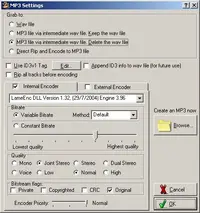
The start the Audiograbber program. Go to the "Settings > MP3 Settings. . ." option.

You then get the MP3 settings. Configure it to look like this.
mp3setting.webp

Then pick OK.

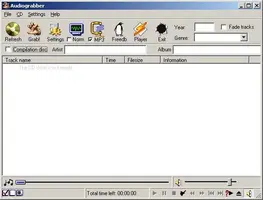
The last thing you need to do is make sure the check box by the MP3 icon in the main window is checked.
ag.webp


Pick the "Freedb" button to see if the track names are available online and then pick "Grab!" and it will start working. I don't usually do run anything else when I'm ripping CDs just to help ensure their quality.

Lastly, if you don't want to rip every song to the default "c:\audiograbber" directory, go to the "Settings > General Settings. . ." to pick a destination directory for your MP3's and you can also set them to sort into folders automatically based on artist and album (check boxes).

I hope this helps.
 

Attachments

  • mp3setting.webp
    mp3setting.webp
    39.3 KB · Views: 128
  • ag.webp
    ag.webp
    25 KB · Views: 143
Chris - you can see in the options window that there are options using the LAME encoder in Audiograbber for setting bitrate and whatnot and it also automatically names the songs..

I almost forgot. In the settings window, I like to pick the third option at the top of

"MP3 file via intermidiate wav file. Delete the wav file"

No use wasting space on your computer.
 
Why is everyone talking about all these other programs for Joe???

He has iTunes, and clearly is looking for the streamlined approach. That's iTunes. Just use what you already have.

All you have to do is boot up iTunes and insert a CD. It will practically do everything for you. Not only that, it will get your songs on your iPod too (you weren't doing that already?).

And as far as all the techno mumbo jumbo listed above, forget it. It's meaningless unless you get into this stuff. It's true that Mpeg and nearly all rip formats are lossy (lose some data and therefore some detail). However, you will not notice the difference listening on your computer. A computer is a bath of electronic noise and interference, practically negating any possibility of obtaining "audiophile" quality output (which by the way is the standard you need to be achieve if you expect to observe the fantastically miniscule difference between a CD and a ripped song.)

So just keep it simple and use iTunes. Steve Jobs may be a freak, but he did that one right.

Hope that helps.
 
I don't know why they suggested what they did. It worked, and really, that's all that mattered. To put things into perspective - the only programs I can use are the internet, Microsoft Word, and the games. If I put a CD into the CD player and it just start playing, I have no idea what to do. We always had a computer in my house for as long as I can remember, I just never used it. I never cared to use it.

So, when I get on here and ask for help, I'll try whatever someone wants to suggest, easy or not, as long as it gets the job done.

Thanks for the suggest though. Only if it had been earlier (no offense to you - I just went with what was suggested first)....

Joe
 
Joe and GRGT1994 - I realized that mine wasn't the easy way out, but I believe that it was your best way to go. Yeah, iTunes can encode it, yeah Windows Media Player will encode it, but because they don't rip to an intermediate file I have had some serious problems with this method causing loud blips and skips in the music that hurt like hell when you're wearing headphones and rocking out to In Flames. Plus I'm a very musical person so the quality is important to me.

iTunes may be fine for some (even most), but I'm very particular and I don't like to half-ass things. So again, I offered the best method that I knew of.