Photo Chop Help

nugget68

Member
Sep 26, 2005
362
3
19
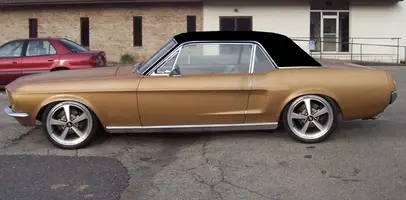
here are a couple of pics of some photchops of my car, what do you guys think...also are there any phot shop experts out there who can help me in color changing...i want to do a two tone black on top and original gold on bottom but i cant figure it out, i have photo shop 7...thanks!
nugget68
 
nugget68 said:
also are there any phot shop experts out there who can help me in color changing...i want to do a two tone black on top and original gold on bottom but i cant figure it out, i have photo shop 7...thanks!
nugget68

Just select the area you want to change with the lasso tool and then play with the color/hue/saturation in Edit > Adjustments. You can also overlay colors that way.
 
65ShelbyClone said:
Just select the area you want to change with the lasso tool and then play with the color/hue/saturation in Edit > Adjustments. You can also overlay colors that way.
i try to do that and it ends up overlaying color over the whole picture rater than the car, its kina hard to explain but instead of changing the color of the car it just puts a different color on the part that i selected and you cant see any of the lines or anything...
 
Don't know where you want it divided or what actual color you want...
 

Attachments

  • Nugget2.webp
    Nugget2.webp
    62.7 KB · Views: 189
Silver66FsBk said:
the files are to small so it looks like crap
when I open the file do you have a bigger file?
if so I could do it for you by the way I'm new here.
Try clicking on the thumbnails....

nugget68 said:
i try to do that and it ends up overlaying color over the whole picture rater than the car, its kina hard to explain but instead of changing the color of the car it just puts a different color on the part that i selected and you cant see any of the lines or anything...
Then you need to concentrate on modifying the existing picture. Here is what I did with the lasso and simply playing with hue and saturation:

View attachment 498491
 
Hey, thats awesome :nice:

What did you use to do that? Lens flare? I dont play with PS as much as I should, so I'm getting rusty. I usually use Image Ready only for making animated gifs. In instances similar to my current avatar, I screen capture frames from whatever video I want a sequence from.
 
65ShelbyClone said:
Hey, thats awesome :nice:

What did you use to do that? Lens flare? I dont play with PS as much as I should, so I'm getting rusty. I usually use Image Ready only for making animated gifs. In instances similar to my current avatar, I screen capture frames from whatever video I want a sequence from.

No I used the paint brush, on layer 2 dropped some yellow on the eyes, then on the same layer, dropped some white inside the eye to make it white hot.

Then I took the 2 layers, First unedited layer, and the one I made with the glow, and tweened the frames 6 times between frames 1 and two. I set the tweened frames at .1 second