
anyone willing to do some photochoping to my car. i have already done a set of wheels and lowered it, but i cant figure out how to do color changing that looks halfway decent. i want the whole top half to be black and the bottom to stay the same color. i want the line of seperation to be the natural line on the top of the fenders, down the side of the doors and off to the trunk. evertime i try it it just puts a black spot on the highlighted area rather than change the color...any help would be greatly appreciated...here is a link to the pick previously posted...http://forums.stangnet.com/showthread.php?t=592755
You are using an out of date browser. It may not display this or other websites correctly.
You should upgrade or use an alternative browser.
You should upgrade or use an alternative browser.
PhotoChop Help...
- Thread starter nugget68
- Start date

- Jul 17, 2001
- 485
- 0
- 0


5.0StangRacer
New Member

milner351
Founding Member
- Jul 17, 2001
- 485
- 0
- 0
I made the color as dark as I could but still light enough where you can see the lines. I didn't overlay black, I selected the area, and made it darker with lightness/contrast.
I made the image on a Mac, so the contrast is a little darker, but on my GFs PC monitor it looks fine.
I could lighten the black a little, but then it would be greyish.
I made the image on a Mac, so the contrast is a little darker, but on my GFs PC monitor it looks fine.
I could lighten the black a little, but then it would be greyish.

DarkBuddha
Founding Member
That would be me... I think HenceForward did an excellent job, but here's my 2 minute version anyway:nugget68 said:ok, i couldnt really tell because i am at work and my monitor is crap...i got the idea from this pic and i thought that whoever did this it looks really good and this is how i would like mine done...
Hope this helps...
Attachments

thanks guys, it must just be my monitor here at work, it is very crappy. i wish i was as talented as you guys on photoshop, i am not very good with being steady enough to get such a good line like you do. the line between the two colors for me would be bad, not very straight at all, what is your trick...
DarkBuddha
Founding Member
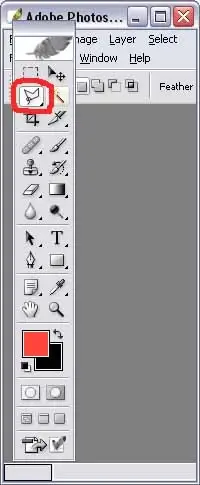
I use the "polygonal Lasso tool", which allows you to click a starting point, then click along the way to create the boundry in lots of little straight lines. For example, I must've clicked 25+ times just to trace the top edges of the fenders and door to create that boundry of the selection. Make sense?
DarkBuddha
Founding Member

69Rcode_Mach1
Active Member
DarkBuddha
Founding Member

thanks buddha i will look on my photshop and see if i have the polygonal Lasso tool feature, the copy that i have is bootleg so i dont know if it has all the functions as the real deal...i like the wheels too, i would say that they are about 18" hard to tell really thought with the photochop...currently i have 15" crager, or some crager imitations. i took one off tonight to paint it because the quality is terrible and the are rusting, i painted them a dark grey color and they turned out nice. for the mean time i put a wheel from a late model mustang on it, it is the 94 gt wheel that is a 3 spoke design but actually is a 6 spoke, i think you probably have seen them...anyway my father in law found the wheel on the side of the road and picked it up because he thought i would want it and he didnt even know it was for a mustang. it is a 17" i think by 8" w/ a 255/40 and it fits like it was made for my car, no spacer or anything...i was always under the impression late model wheels wouldnt work with out a spacer...
DarkBuddha
Founding Member
Your version of photoshop probably has it... I'm using a low buck stripped down version that came with my scanner called Photoshop Elements. I've got a full version of PS but with the filters and plug-ins, I'm not patient enough to let it load up just to do quicky stuff that I can do with Elements. Anyway, I know my full version of PS has the tool... as I recall, it's just one of the options available when you choose the Lasso tool.
Oh, and about:

Oh, and about:
Did you actually install it on the front and it fit??? That would be awesome! I was pretty darn sure you needed spacers for all '94-'04 SN95 17x8 wheels too. They'll usually fit the rear without spacers, but they will completely interfere in the front with either the upper control arm (at the ball joint) or with the outer shock tower housing. If you've found a wheel that'll work without spacers, I'm sure there are other folks that would love to know.nugget68 said:it is a 17" i think by 8" w/ a 255/40 and it fits like it was made for my car, no spacer or anything...i was always under the impression late model wheels wouldnt work with out a spacer...

stangman16
Active Member

69Rcode_Mach1
Active Member
Don't get me wrong the new magnums look great in 17 inch on the 69-70's but not on that car. They are too big and ruin the stance. Just my opinion you need to be happy that is all that counts.
nugget68 said:ok, i couldnt really tell because i am at work and my monitor is crap...i got the idea from this pic and i thought that whoever did this it looks really good and this is how i would like mine done...
That's my car !!!!!
I am glad that it was a source of inspiration. Did you see the other color schemes we came up with?? In the end I decided to change the color combo and go with a less pimpified version. She is in paint right now and hope to see her dressed up soon!!!!!!!!
Similar threads

- Replies
- 11
- Views
- 365

- Replies
- 0
- Views
- 814

- Replies
- 0
- Views
- 1K

- Replies
- 51
- Views
- 6K

