Matthiasj wanted a little how-to of how I smoothed and painted my upper intake so here goes:
Step 1: Uninstall intake (kinda like "open hood" lol)

Step 2: Brush on "Aircraft Remover" stripper to the powdercoating (wear gloves cuz this stuff is pretty harsh, also wear some breathing protection). It may take a few applications to get it all off.

Step 3: The powdercoat will begin to wrinkle up as the stripper works on it, let all of it wrinkle then begin scraping. I used steel wool and a putty knife. Then I hosed it down outside to wash off any excess chemicals from it so I could handle it without gloves.

Step 4: This shows the intake after I sanded it smooth. I used a combo of tapered sanding rolls, a palm sander, and sanding by hand to remove all the textured casting and ground down any seams or indentations. I started with 100 grit and worked up to 400 grit. I dont have a pic of this part, but I then laid down 2 coats of self-etching primer to the intake then wetsanded it with 400 grit till it was perfectly smooth.

Step 5: Finished product. Painted the intake with Dupli-Color 500 Degree silver, 500 Degree Gloss black, and 500 degree red. I added a little custom touch to the snake with the red. Also, I mirror polished the word COBRA, part of the snake, and the outline of the area.

Hope this helps you out. It's a decent amount of work, but I always hated how dull the intake looked, and it had gotten a few stains on it that I couldn't get off, so I decided to get dirty and see what I could do.
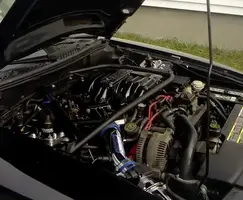
Here's a couple pics of it in the engine compartment:
when I first did it:

current:

Step 1: Uninstall intake (kinda like "open hood" lol)
Step 2: Brush on "Aircraft Remover" stripper to the powdercoating (wear gloves cuz this stuff is pretty harsh, also wear some breathing protection). It may take a few applications to get it all off.
Step 3: The powdercoat will begin to wrinkle up as the stripper works on it, let all of it wrinkle then begin scraping. I used steel wool and a putty knife. Then I hosed it down outside to wash off any excess chemicals from it so I could handle it without gloves.
Step 4: This shows the intake after I sanded it smooth. I used a combo of tapered sanding rolls, a palm sander, and sanding by hand to remove all the textured casting and ground down any seams or indentations. I started with 100 grit and worked up to 400 grit. I dont have a pic of this part, but I then laid down 2 coats of self-etching primer to the intake then wetsanded it with 400 grit till it was perfectly smooth.
Step 5: Finished product. Painted the intake with Dupli-Color 500 Degree silver, 500 Degree Gloss black, and 500 degree red. I added a little custom touch to the snake with the red. Also, I mirror polished the word COBRA, part of the snake, and the outline of the area.
Hope this helps you out. It's a decent amount of work, but I always hated how dull the intake looked, and it had gotten a few stains on it that I couldn't get off, so I decided to get dirty and see what I could do.
Here's a couple pics of it in the engine compartment:
when I first did it:
current: