new camera set-up = 2 new pics

Blackened302

Active Member
Jul 21, 2005
1,439
0
36
South TX
**EDIT: new camera set-up = *MORE* pics

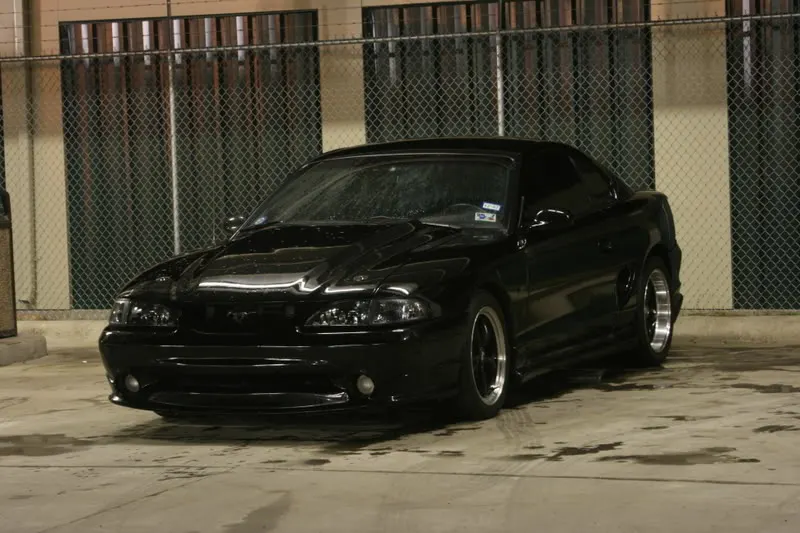
so i borrowed my gf's (now fiance! got engaged 2 weeks ago) digital rebel xti and i've started fiddling with it. went out to my local carwash late last night to get some pics w/ the tripod and a couple came out really well, i think. i took about 25 and only liked these two, too bad i didn't take notes on the settings i used. shoulda dried the car, too, but i'm definately gonna start shooting more. these are raw, no photochopping at all:
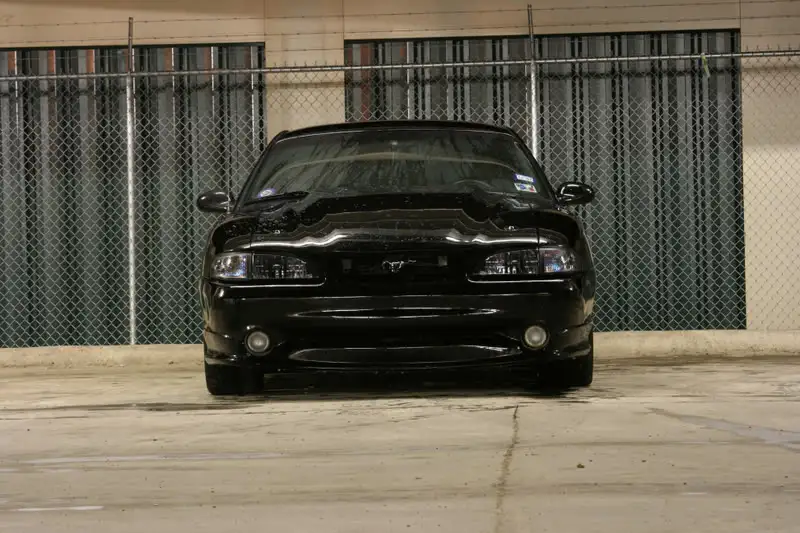
headon-1.webp


frontleftangle-1.webp


opinions? suggestions/tips?
 

Attachments

  • headon-1.webp
    headon-1.webp
    50.2 KB · Views: 103
  • frontleftangle-1.webp
    frontleftangle-1.webp
    52.7 KB · Views: 79
Looks good, maybe bring a little clamp light to put alittle light on the front end to show off some of the details lost with all the black paint...you can try to get some red to yellow from the light. You might need to bring a few diff. bulbs if diff. watts and style...like frosted, clear, maybe a holig. to see if you can make some cool effects.

The fence looks good against that slick paintjob :nice: kinda like its in jail for kickin' ass.:p
 
opinions? suggestions/tips?

Suggestion: Learn how to effectively use spot metering. Doing so will allow you to bring out the details in the dark areas more effectively without needing additional lighting. The trick to spot metering is simply 'spotting' an area that you want to be a MIDTONE in the photograph. Something like the cement would work well in this instance. Consult the user's manual for more specific details on how to use it with that particular camera. Also, the next time you photograph the car facing that direction, try turn the wheels a bit towards the passenger side. It makes the car looker meaner and lets us see the wheels better.

But yeah, getting the specific settings you used would be really useful!

(And congrats on the engagement, I'm recently engaged myself!)
 
the first pic is :shock: is like you meet somebody in the blind alley at night and you know you gonna have to face him to go thru ( but where? this is f....ng blind alley!)
seriously , car looks great :nice: :nice: :nice:
 
heheh, thanks guys, i appreicate the comments and suggestions.

i keep forgetting to smoke my fogs. i was going to order the smoked/clear ones from blueovalindustries, but i still have some nightshades tint left so i'm probably gonna just spray them a little and save some money meanwhile.

AaronG: wireeater over on svtp made the sig for me and did an AWESOME job using the chittiest pics ever, hehe.

GreenStangGT: i take it spot metering is a feature in the camera? i have the manual somewhere, but i'm a "shoot first, ask questions later" kind of guy, hahaha. i'll look into it, though--i can see how it would help bring out the details in the front end. congrats to you too on the engagement, btw!

nick: great minds think alike, brotha

tom: thanks, dude! still jealous i couldn't use the front bumper you went with! and of that SICK engine bay and what's in it!
 
You can always look at the Exif information even after you've edited them . . .

1st photo:
Shutter: 15sec
Aperture: F/11
Focal Length:80mm
ISO: 100
Taken on 5/7/2007 at 12:38pm

2nd photo:
Shutter: 10sec
Aperture: F/11
Focal Length:80mm
ISO: 100
Taken on 5/7/2007 at 12:49pm

I take it you used a tripod. Also, the metering won't do much for you here because you're car is black. The contrast ratio between the car and the walls will exceed the Xti's dynamic range before bringing out decent detail. You could have gone to F/10 (increase the exposure compensation by 1/3 step) but any more and the walls will start looking washed out. You can't trust the metering until you get a feel for what it's going to do. You could, however, bracket it and make an HDR image, but HDR images are flat and boring. I'd rather not see all the detail in the car since it gives it a darker/mysterious night rider kind of feel :p

As for the pictures, there are plenty of tricks you could do to make the images pop a little more, but I tend to be most critical of the background. If it's too close to the background or there's too much going on, it becomes distracting. The first thing I see is that the fence is crooked.

You can also play with the ambient lighting to highlight certain characteristic of the car you want to show off, like the wheels and the hood and maybe the silhouette. Fluorescent lights are great for running highlights along the length of the car, bringing out the body lines.
 
Since I know nothing about the camera itself, I can comment on you composition and give my input with a little "adjusting".

The first thing I see is that you need to learn to hold the camera level, unless you're going for an off-kilter look on purpose. Both pictures are slightly tilted to the left.

Also, pay attention to your background.

The first pic is a good concept, but the car should have been centered either on the pillar or on the tin. As it stands, you've got the pillar, the tin and the fence post all competeing for geometric center. To me, it makes the whole picture off center.

The second picture is a little better executed. As previously stated, the angle of the tires affects the "look" of the car. Also, pay attention to the other things in the picture. Extra stuff like the garbage can on the edge distract from the subject matter.

You've got a pretty good spot there for shooting a car, just pay attention to the little details and you might come up with something really good there.

Here are my slightly modified versions of your pictures.

View attachment 404434
View attachment 404436
 
thanks for the tips, guys.

forgot about checking the properties>details for the settings. now if only i can remember how to set them on the camera again, hehe. guess it'll just take more time messing with it. either way, i'm really impressed w/ the quality of this thing + a tripod.

i really wasn't concerned w/ the background before you guys mentioned it, now all the un-symmetry (is that a word?) gets to me, heh. next time i shoot, i'll definately take it into account. i really appreciate the tips, thanks!

christian: thanks, man, you're one of the guys on here that's always been supportive--i appreciate it, buddy.
 
#2 looks just plain bad-azz....I would agree with the fogs...get some Ultra clears..
Something makes me think some side exhaust exiting before the tire would finish the "Punisher" look...Car looks damn fine to me...

Funny I just watched that movie the other night...Seen that logo and took me a minute to put 2&2 together...That ain't no GTO though... : )