

You are using an out of date browser. It may not display this or other websites correctly.
You should upgrade or use an alternative browser.
You should upgrade or use an alternative browser.
Steve's Megasquirt/tunerstudio Help Thread
- Thread starter hoopty5.0
- Start date

MAT/CLT CORRECTION Battling the Dreaded Heat Soak
This information pertains to the issue that many MegaSquirt users often refer to as "HEAT SOAK". However this has nothing to do with the sensor itself and everything to do with the environment that it is placed in. Many myths surround the "heat soak" that we all experience. One such myth is that the sensor made from X material is susceptible to the heating effect from its base material, this is a bogus claim. No matter where you place the IAT/MAT sensor it will skew the reading, this is because at low load/rpm the air in the manifold can easily achieve the same temperature as the CLT[coolant/ engine temp]. This is true regardless of what the manifold is constructed of......
Why This is Important
The air density correction table uses the MAT/IAT temp sensor for the fuel trim correction. Basically the hotter the air the less oxygen it has in it and vice versa, this trim table will adjust for fuel based on the air temperature. Where this comes into play is when you have a car at idle or cruise, without the MAT/CLT correction your MAT density correction will be skewed. Some of you who do not use ego correction at idle [I don't either and don't suggest it] will notice a lean or rich condition even though the ve table has not changed. This can and will throw off the VE auto tune as well. Taking some time to get this worked out will pay off in the long run.
The Table that needs adjustment
Under the Basic/Load Settings Tab you will find a trim table called MAT/CLT Correction, once in this tab you will need to click on the settings box in the upper left corner of the table [it is denoted with 3 small dots in the box] it is located next to the notes bubble. Once you have that open autoscale the Y and X values this makes the table much easier to look at.
Once you are done take a look at the graph, it will look like a flat line with no Y axis values. This is where you will start to plug values in, at low load/rpm values you will want more blending with the table quickly leveling out to 0 at high load/rpm values... I would start with a maximum of 40% or so and go from there, here is a picture of the table i will be using.
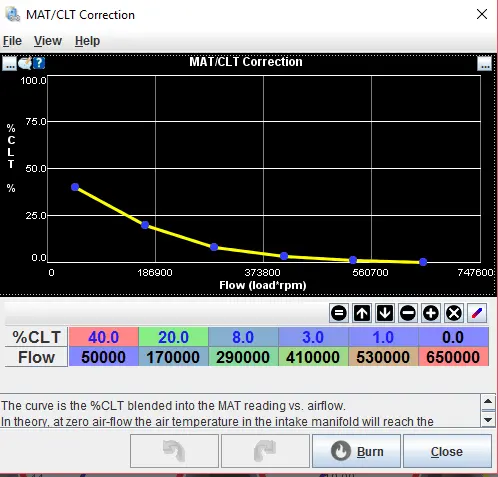
This is a nonlinear blend curve for the MAT/IAT correction...
I have attached a copy of the Dialog settings for this table simply download the file and save it in your tunerstudio folder, once you have the MAT/CLT correction table open select File and load the dialog settings i have supplied.
I hope that this has been informative for a detailed explanation of other settings or tables please ask.
Steve
This information pertains to the issue that many MegaSquirt users often refer to as "HEAT SOAK". However this has nothing to do with the sensor itself and everything to do with the environment that it is placed in. Many myths surround the "heat soak" that we all experience. One such myth is that the sensor made from X material is susceptible to the heating effect from its base material, this is a bogus claim. No matter where you place the IAT/MAT sensor it will skew the reading, this is because at low load/rpm the air in the manifold can easily achieve the same temperature as the CLT[coolant/ engine temp]. This is true regardless of what the manifold is constructed of......
Why This is Important
The air density correction table uses the MAT/IAT temp sensor for the fuel trim correction. Basically the hotter the air the less oxygen it has in it and vice versa, this trim table will adjust for fuel based on the air temperature. Where this comes into play is when you have a car at idle or cruise, without the MAT/CLT correction your MAT density correction will be skewed. Some of you who do not use ego correction at idle [I don't either and don't suggest it] will notice a lean or rich condition even though the ve table has not changed. This can and will throw off the VE auto tune as well. Taking some time to get this worked out will pay off in the long run.
The Table that needs adjustment
Under the Basic/Load Settings Tab you will find a trim table called MAT/CLT Correction, once in this tab you will need to click on the settings box in the upper left corner of the table [it is denoted with 3 small dots in the box] it is located next to the notes bubble. Once you have that open autoscale the Y and X values this makes the table much easier to look at.
Once you are done take a look at the graph, it will look like a flat line with no Y axis values. This is where you will start to plug values in, at low load/rpm values you will want more blending with the table quickly leveling out to 0 at high load/rpm values... I would start with a maximum of 40% or so and go from there, here is a picture of the table i will be using.
This is a nonlinear blend curve for the MAT/IAT correction...
I have attached a copy of the Dialog settings for this table simply download the file and save it in your tunerstudio folder, once you have the MAT/CLT correction table open select File and load the dialog settings i have supplied.
I hope that this has been informative for a detailed explanation of other settings or tables please ask.
Steve
Last edited:

- Mar 2, 2015
- 6,948
- 5,824
- 213
OK will do, man. That's right  ....you can't know where its supposed to be without the tune. It hasn't changed since you sent me the last one.
I'll post after I put the kiddo on the buss for first day of school ...my youngest is a 5th grader.
There's also some other changes...like my 192 degree thermostat...
You really are a busy guy...I'm in no rush at all....seriously.
....you can't know where its supposed to be without the tune. It hasn't changed since you sent me the last one. I'll post after I put the kiddo on the buss for first day of school
...my youngest is a 5th grader.There's also some other changes...like my 192 degree thermostat...
You really are a busy guy...I'm in no rush at all....seriously.
@Noobz347 I need some more files put on the allowed list..... pm me for details please... also I did not start this thread and need to be able to make changes to it. I need/want to sticky some of the posts I have made to make them easy to find in the clutter. I don't know how to do this /////HELP PLEASE

@Noobz347 I need some more files put on the allowed list..... pm me for details please... also I did not start this thread and need to be able to make changes to it. I need/want to sticky some of the posts I have made to make them easy to find in the clutter. I don't know how to do this /////HELP PLEASE
What you should do is create another thread and then copy the posts over that you want to include. I think as an SN tech, you may already have these abilities. Do you have a checkbox next to each post? If so, what happens when you click on it?


- Mar 2, 2015
- 6,948
- 5,824
- 213
Here's my datalog and tune. I didn't have my LC1 chosen in the MegaLog settings. I did a log of my quick drive and idle. I'm sure most of you guys know more about this than me.
Attachments
I just made a tech thread for the detailed writeup so they are easy to find. Kind of like a sticky thread for my rainman moments https://www.stangnet.com/mustang-forums/threads/megasquirt-tuner-studio-tech-thread.899945/
I just made a tech thread for the detailed writeup so they are easy to find. Kind of like a sticky thread for my rainman moments https://www.stangnet.com/mustang-forums/threads/megasquirt-tuner-studio-tech-thread.899945/
...and of course, you have the ability to steal/copy relevant posts from ANY thread that you have access too.
Almost as if someone planned it like that...


Sparky714
5 Year Member
I want to set up this table in my tune, but I don't see your attachment.MAT/CLT CORRECTION Battling the Dreaded Heat Soak
This information pertains to the issue that many MegaSquirt users often refer to as "HEAT SOAK". However this has nothing to do with the sensor itself and everything to do with the environment that it is placed in. Many myths surround the "heat soak" that we all experience. One such myth is that the sensor made from X material is susceptible to the heating effect from its base material, this is a bogus claim. No matter where you place the IAT/MAT sensor it will skew the reading, this is because at low load/rpm the air in the manifold can easily achieve the same temperature as the CLT[coolant/ engine temp]. This is true regardless of what the manifold is constructed of......
Why This is Important
The air density correction table uses the MAT/IAT temp sensor for the fuel trim correction. Basically the hotter the air the less oxygen it has in it and vice versa, this trim table will adjust for fuel based on the air temperature. Where this comes into play is when you have a car at idle or cruise, without the MAT/CLT correction your MAT density correction will be skewed. Some of you who do not use ego correction at idle [I don't either and don't suggest it] will notice a lean or rich condition even though the ve table has not changed. This can and will throw off the VE auto tune as well. Taking some time to get this worked out will pay off in the long run.
The Table that needs adjustment
Under the Basic/Load Settings Tab you will find a trim table called MAT/CLT Correction, once in this tab you will need to click on the settings box in the upper left corner of the table [it is denoted with 3 small dots in the box] it is located next to the notes bubble. Once you have that open autoscale the Y and X values this makes the table much easier to look at.
Once you are done take a look at the graph, it will look like a flat line with no Y axis values. This is where you will start to plug values in, at low load/rpm values you will want more blending with the table quickly leveling out to 0 at high load/rpm values... I would start with a maximum of 40% or so and go from there, here is a picture of the table i will be using.
This is a nonlinear blend curve for the MAT/IAT correction...
I have attached a copy of the Dialog settings for this table simply download the file and save it in your tunerstudio folder, once you have the MAT/CLT correction table open select File and load the dialog settings i have supplied.
I hope that this has been informative for a detailed explanation of other settings or tables please ask.
Steve
The file type is not currently on the approved list. I have detailed the instructions on how in my post, I have an updated picture of what I'm going to use that's a bit more aggressive than what's there.I want to set up this table in my tune, but I don't see your attachment.
@Noobz347 can you add (.msqpart) files to the approved list I know pita.

@90sickfox I did what I could with the datalog that you sent, I adjusted the fuel table with a best guess as to what you needed. The WBO2 in the log required some jockeying of settings to make it work. I need a good log of the car warmed up before you drive it, the information from a cold engine is very skewed and requires looking at multiple tables to do any useful math for the VE adjustment. So get the engine warm then take a drive. I went ahead and filled in the tables for you that I did my latest writeup about.
Attachments
The file type is not currently on the approved list. I have detailed the instructions on how in my post, I have an updated picture of what I'm going to use that's a bit more aggressive than what's there.
@Noobz347 can you add (.msqpart) files to the approved list I know pita.
That's actually a 6 letter extension? .msqpart
Yeah .msqpart is the extension 7 letters I believe. Weird huhThat's actually a 6 letter extension? .msqpart
- Mar 2, 2015
- 6,948
- 5,824
- 213
Hey, Steve, I hope your staying safe down there. Had a little bit of time to load the tune you sent. As it starts to warm up I'm getting a pretty bad idle surge ( had to throttle it a couple times to keep it running). The only major change I saw was that the MAP sensor went from 1 to 2 in the settings. Here's the log. Stay safe down there. I've got a couple close friends riding it out in Ft. Myers.
Attachments
Hmm I will have to look later on internetz right now. I don't remember making a map sensor change.... maybe for the baro correction... mspnp2 should have the mapdaddy with realtime baro.... I'll check it out most likely my best guess on fuel turned out to be leanHey, Steve, I hope your staying safe down there. Had a little bit of time to load the tune you sent. As it starts to warm up I'm getting a pretty bad idle surge ( had to throttle it a couple times to keep it running). The only major change I saw was that the MAP sensor went from 1 to 2 in the settings. Here's the log. Stay safe down there. I've got a couple close friends riding it out in Ft. Myers.

Similar threads

- Replies
- 13
- Views
- 2K

Progress Thread
mnky99 2001 V6 evap core, ac compressor, heater core replacement
- Replies
- 1
- Views
- 647

- Replies
- 119
- Views
- 22K
Progress Thread
Family member 1989 GT- Backstory and updates
- Replies
- 15
- Views
- 1K
