# VE Table Tuning — What I Need From You
I've built a tool that analyzes your MegaSquirt datalog and tells you exactly what your VE table should be.
**To run your tune I need 5 things:**
---
**1. Screenshot of your injector dead time table**
In TunerStudio: Go to Fuel → Injector Dead Time. Screenshot the entire table. I need to see the voltage vs dead time values.
**2. Injector size and brand**
Tell me exactly what injectors you're running. Example: "Ford Racing 24lb", "Deatschwerks 42lb", "ACCEL 30lb", etc. If you know the flow rate at a specific pressure (e.g., 24 lb/hr @ 43.5 psi), include that.
**3. Your VE table — copy/paste into a text file**
In TunerStudio: Go to Fuel → VE Table 1. Right-click the table → Select All → Copy. Open Notepad, paste it, save as a .txt file and upload it. I need the raw numbers, not a screenshot of this one.
**4. A datalog — .mlg file from MegaSquirt**
Record a datalog in TunerStudio while driving. The more driving conditions you cover, the better the results:
- Idle for 30-60 seconds (warmed up)
- Normal city driving with moderate acceleration
- Highway cruise at a few different speeds
- A few WOT pulls if you're comfortable (2nd or 3rd gear, safe location)
- Some deceleration / coast down
**Important:**
- Engine needs to be fully warmed up before you start logging (coolant temp 160°F+)
- Wideband O2 sensor required — narrowband won't work for this
- Log needs to include at minimum: RPM, MAP, TPS, AFR, EGO cor1, Accel PW
- .mlg format only — this is what TunerStudio saves by default
- 10-15 minutes of driving is plenty, longer is better
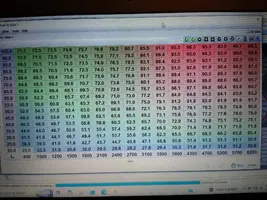
**5. Screenshot of your VE table (the colored grid view)**
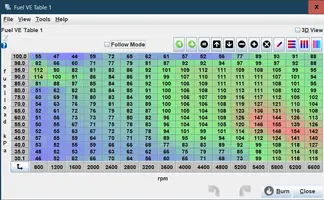
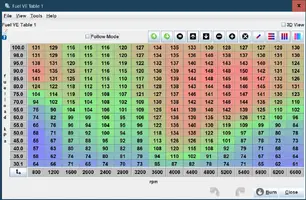
This one IS a screenshot. I need to see your RPM and MAP breakpoints along the axes. Go to Fuel → VE Table 1 and screenshot the full table with the axis labels visible.
---
**What you get back:**
A corrected VE table you can paste directly into TunerStudio, plus a full diagnostic report showing every cell — what changed, why, how confident the correction is, and which cells need more driving data.
To be clear — I am not adjusting your AFR targets, your timing, or anything else. This tool only corrects your VE table to hit whatever AFR targets you already have set. That's it. If your targets are wrong, that's a separate conversation that I'm not having here. Please don't ask me about spark tables, injector sizing, idle issues, boost targets, or anything outside of VE. I will not respond to it. VE table corrections only.
Hit me up if you have questions.
I've built a tool that analyzes your MegaSquirt datalog and tells you exactly what your VE table should be.
**To run your tune I need 5 things:**
---
**1. Screenshot of your injector dead time table**
In TunerStudio: Go to Fuel → Injector Dead Time. Screenshot the entire table. I need to see the voltage vs dead time values.
**2. Injector size and brand**
Tell me exactly what injectors you're running. Example: "Ford Racing 24lb", "Deatschwerks 42lb", "ACCEL 30lb", etc. If you know the flow rate at a specific pressure (e.g., 24 lb/hr @ 43.5 psi), include that.
**3. Your VE table — copy/paste into a text file**
In TunerStudio: Go to Fuel → VE Table 1. Right-click the table → Select All → Copy. Open Notepad, paste it, save as a .txt file and upload it. I need the raw numbers, not a screenshot of this one.
**4. A datalog — .mlg file from MegaSquirt**
Record a datalog in TunerStudio while driving. The more driving conditions you cover, the better the results:
- Idle for 30-60 seconds (warmed up)
- Normal city driving with moderate acceleration
- Highway cruise at a few different speeds
- A few WOT pulls if you're comfortable (2nd or 3rd gear, safe location)
- Some deceleration / coast down
**Important:**
- Engine needs to be fully warmed up before you start logging (coolant temp 160°F+)
- Wideband O2 sensor required — narrowband won't work for this
- Log needs to include at minimum: RPM, MAP, TPS, AFR, EGO cor1, Accel PW
- .mlg format only — this is what TunerStudio saves by default
- 10-15 minutes of driving is plenty, longer is better
**5. Screenshot of your VE table (the colored grid view)**
This one IS a screenshot. I need to see your RPM and MAP breakpoints along the axes. Go to Fuel → VE Table 1 and screenshot the full table with the axis labels visible.
---
**What you get back:**
A corrected VE table you can paste directly into TunerStudio, plus a full diagnostic report showing every cell — what changed, why, how confident the correction is, and which cells need more driving data.
To be clear — I am not adjusting your AFR targets, your timing, or anything else. This tool only corrects your VE table to hit whatever AFR targets you already have set. That's it. If your targets are wrong, that's a separate conversation that I'm not having here. Please don't ask me about spark tables, injector sizing, idle issues, boost targets, or anything outside of VE. I will not respond to it. VE table corrections only.
Hit me up if you have questions.